
Managing a home generates a surprising amount of information: appliance manuals, contractor receipts, maintenance schedules, warranty documents, paint colors, and the ever-growing list of things that need fixing. Most of us default to a messy combination of file folders, phone photos, and sticky notes. Home management apps promise to replace all of that with a single organized system, but the category is crowded and the quality varies widely. I compared the most popular options using public information (each app's published features, pricing, app store listings, and press coverage) to see which ones look most likely to deliver. Here is what I found.
Updated September 2026: Centriq shut down on January 31, 2026, so it is no longer a recommendation. Dib and Hint are new to this list.
What to Look for in a Home Management App
Before diving into individual apps, it helps to know what separates a genuinely useful home management tool from a glorified notes app. These are the criteria I evaluated:
- Home inventory tracking — Can you catalog your belongings, appliances, and systems with enough detail to be useful for insurance or resale? (If you're starting from zero, our free home inventory checklist template shows what a complete inventory covers.)
- Maintenance scheduling — Does the app help you stay on top of recurring tasks like HVAC filter changes, gutter cleaning, and water heater flushes?
- Document storage — Can you upload and organize warranties, receipts, contracts, and manuals in a way that makes them easy to find later?
- Ease of setup — How long does it take to go from downloading the app to having a functional home profile? If onboarding takes an entire weekend, most people will quit.
- Pricing — Is the free tier genuinely usable, or does the app paywall critical features?
- Mobile experience — Since you often need this information while standing in front of an appliance or talking to a contractor, the mobile experience matters as much as the desktop one.
The 8 Best Home Management Apps (Plus Centriq, Now Shut Down)
HomeZada
HomeZada is the most feature-rich option on this list, combining home inventory, maintenance scheduling, remodeling project management, and financial tracking into a single platform. If you want one app that does everything related to homeownership, this is the closest thing to it.
Key features:
- Comprehensive home inventory with photo documentation and replacement values
- Maintenance calendar with reminders and task tracking
- Remodeling cost estimator and project management tools
- Financial dashboard showing home value, equity, and expenses over time
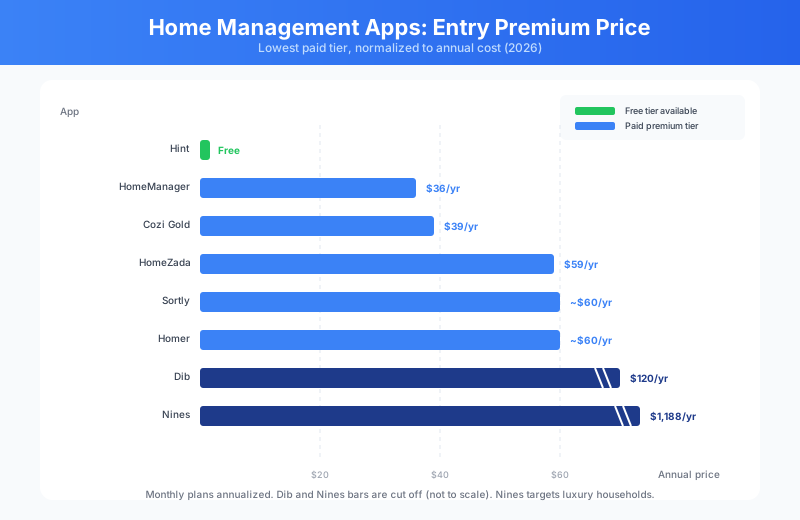
Pricing: Free tier available with limited features. Premium plans start at $59/year for a single home, $99/year for multiple properties.
Best for: Homeowners who want a single platform to manage finances, maintenance, and inventory together.
Pros: Deepest feature set of any app in this category. The financial tracking alone — mortgage amortization, home value estimates, expense categorization — would justify a standalone product. Solid web interface with good mobile apps.
Cons: The breadth of features creates a learning curve. Setup takes time because there is a lot to fill in. The interface design feels dated compared to newer competitors. Some users may find they only use a fraction of what is available.
Homer
Homer keeps things deliberately simple: it is a digital filing cabinet for your home. You store documents, add notes about your property, and that is largely it. No complex project management, no financial calculators — just a clean place to keep everything organized.
Key features:
- Clean document storage with categories for each room and system
- Simple task lists for maintenance and to-dos
- Ability to share home profiles with family members or service providers
- Quick-capture for receipts, photos, and notes
Pricing: Free with optional premium features. Premium at $4.99/month adds unlimited storage and advanced sharing.
Best for: Homeowners who want simple, fast document organization without feature overload.
Pros: Beautiful, intuitive interface that requires almost no learning curve, and onboarding is designed to be quick. The focus on simplicity means you actually use it instead of abandoning it after a week.
Cons: Limited maintenance scheduling — you get basic task lists but not smart recurring reminders. No inventory valuation or financial tools. If you need anything beyond document storage and simple lists, you will outgrow Homer.
Nines
Nines is built for high-end households — think estates, second homes, and properties with staff. If you manage a luxury property (or multiple properties) and need to coordinate housekeepers, landscapers, and property managers, Nines is the only app on this list designed specifically for that use case.
Key features:
- Household staff management with task assignment and scheduling
- Multi-property support with separate profiles for each residence
- Vendor and service provider management with contact details and history
- Detailed property manuals for onboarding new staff or caretakers
Pricing: Starting at $99/month. Custom enterprise pricing for property management companies.
Best for: Owners of luxury or multi-property households who need to manage staff and vendors.
Pros: Nothing else on the market does what Nines does for high-end household management. Staff scheduling, vendor coordination, and the property manual feature are all excellent. The interface is polished and professional.
Cons: The price point puts it out of reach for most homeowners. If you own a standard single-family home without staff, this is massive overkill. Features oriented toward typical homeowner needs (like maintenance reminders or budget tools) are secondary to household management.
Sortly
Sortly is a general-purpose inventory app that works well for home inventory specifically. If your primary goal is cataloging what you own — for insurance, moving, or just personal organization — Sortly does that one thing better than the home management apps that include inventory as a secondary feature.
Key features:
- Visual inventory with photo-first interface and custom tags
- QR code and barcode scanning for quick item entry
- Custom fields and folders to organize by room, category, or value
- Export reports for insurance claims or moving checklists
Pricing: Free for up to 100 items. Advanced plan at $4.99/month for unlimited items and QR labels. Ultra at $14.99/month adds team features.
Best for: Homeowners focused specifically on cataloging possessions for insurance or organization.
Pros: The best pure inventory experience on this list. Photo-first design makes browsing your stuff intuitive. QR code labels are genuinely useful for storage bins and less-used spaces. Export to CSV or PDF is clean and insurance-ready.
Cons: Sortly is an inventory tool, not a home management app. No maintenance scheduling, no document storage for home-related paperwork, no property information. You would need to pair it with another app for full home management.
Centriq (shut down January 2026)
Update: Centriq shut down on January 31, 2026. The app was removed from the App Store and user accounts were deleted, so it is no longer an option. We have kept the original review below for anyone comparing alternatives; Dib and Homer are the closest replacements for its appliance-tracking features; our Centriq alternatives guide covers how to rebuild your records.
Centriq took a different approach: instead of asking you to manually enter everything about your home, it focuses on the products and appliances you own and provides manuals, how-to videos, and maintenance guidance for each one. Think of it as a smart owner's manual for everything in your house.
Key features:
- Product recognition that pulls up manuals and care guides automatically
- How-to video library for common maintenance tasks on your specific appliances
- Maintenance reminders based on manufacturer recommendations
- Transfer-ready home profile you can hand to a new owner
Pricing: Free for homeowners. Revenue comes from brand partnerships and product data.
Best for: Homeowners who want quick access to appliance manuals and maintenance instructions without manual data entry.
Pros: The lowest-effort setup on this list — scan a product or search the database, and Centriq fills in the details. The video how-to content is surprisingly useful. The transfer feature is a nice touch when selling a home.
Cons: Heavily focused on products and appliances, so broader home management (documents, renovation projects, financial tracking) is not covered. The database does not include everything, so some products require manual entry. The business model depends on brand partnerships, which raises questions about long-term neutrality.
Cozi
Cozi is not a home management app in the traditional sense — it is a family organization app that happens to be useful for household coordination. If your main challenge is getting everyone in the family on the same page about chores, appointments, and shared tasks, Cozi handles that well.
Key features:
- Shared family calendar with color-coded schedules for each member
- Shopping and to-do lists that sync across all family members' devices
- Meal planning with recipe storage and automatic shopping list generation
- Journal feature for capturing family moments and notes
Pricing: Free with ads. Cozi Gold at $39/year removes ads, adds a birthday tracker, and adds a month-view calendar.
Best for: Families who need a shared calendar and coordinated household task management.
Pros: Extremely well-designed for family coordination. The shared calendar and shopping lists work smoothly across iOS and Android. Setup is fast. The free tier is genuinely useful without feeling crippled.
Cons: Not a home management app in any meaningful property-focused sense. No home inventory, no document storage, no maintenance scheduling for house systems. If you need to track your water heater age or store a roofing warranty, Cozi is not the answer.
HomeManager
HomeManager positions itself as a digital owner's manual for your house. You build a profile of your home's systems and components, and the app provides maintenance schedules, useful life estimates, and organized storage for related documents.
Key features:
- Pre-built home system templates covering HVAC, plumbing, electrical, roofing, and more
- Maintenance schedules based on system type and age
- Document and photo storage organized by room and system
- Home value and improvement tracking
Pricing: Free basic version. Pro at $2.99/month adds unlimited systems and document storage.
Best for: Homeowners who want a structured digital manual for their home's systems and components.
Pros: The system-focused approach means you get relevant maintenance schedules without much manual configuration. Affordable pricing. Covers the basics well for a straightforward single-home setup.
Cons: The interface is functional but not inspiring. Limited inventory features — this is about the house itself, not what is inside it. No collaboration or sharing features in the free tier. Smaller development team means updates come slowly.
Dib
Dib is an AI-first home management app built around the idea of "chatting with your home." You photograph an item, and its Smart Add feature identifies it, finds the manual, estimates its value, and checks it against recall databases. An AI assistant then answers questions from your own manuals and records.
Key features:
- Photo-based item recognition with automatic manual lookup
- AI chat that answers questions from your own documents and inventory
- Recall monitoring across CPSC, NHTSA, and USDA databases
- Vehicle tracking with VIN decoding, recalls, and maintenance
- Maintenance reminders, a home timeline, and multi-property support
- An AI design studio and a separate product for landlords and property managers
Pricing: Free plan with unlimited items, photos, and documents, plus 14 AI chats and 4 Smart Add scans a month. Pro is $10/month per property billed annually ($120/year) for unlimited AI features.
Best for: Homeowners who want the broadest feature set with AI doing most of the data entry, and anyone migrating from Centriq.
Pros: The most generous free plan in the category. Native apps on iOS and Android plus the web. Recall monitoring and vehicle tracking are rare in this category. A developer API for anyone who wants to connect other tools.
Cons: Still labelled beta. Pro pricing is per property, so multi-home owners pay per house. The breadth of features (design studio, gamified quests, live weather and flood data) can be more than a homeowner who just wants organized records needs. No comparison of your contents against your insurance policy.
Visit Dib · Dib vs MyHomePlatform
Hint
Hint is a new AI home management app co-founded by Martha Stewart that launched on iOS in July 2026 with a $10 million seed round. It builds a home profile from public property records, weather, and soil data, then layers on maintenance scheduling and an AI assistant.
Key features:
- Home profile built automatically from public records and environmental data
- AI-powered maintenance scheduling with push notifications
- Document storage for inspections, warranties, mortgages, and insurance policies
- A chatbot for questions about home systems and finances
- Appliance photo recognition and a "home score" for how well the home is managed
Pricing: Free at launch, with no subscriptions or ads. The company has said premium features such as multiple properties will come later, and it plans to earn referral fees from home service providers and insurers.
Best for: New homeowners who want guidance on what to do and when, with minimal setup.
Pros: Very low setup effort, since much of the home profile is filled in for you. Strong brand and homekeeping expertise behind the advice. Free.
Cons: iOS only at launch. Brand new, so the long-term feature set and pricing are unsettled. A referral-fee business model means recommendations for contractors or insurance may be paid placements.
A Note on MyHomePlatform
Full disclosure: MyHomePlatform is our product, and it is not on the list above because it is still in development and you cannot use it yet. It started because I was frustrated that no app answered the question I cared about most: if something happened to the house tomorrow, would my insurance actually cover what is in it?
We are building MyHomePlatform around that question. The plan for the first version is a home record that holds your closing documents, policies, warranties, and a photo inventory of what you own, and compares that inventory against your insurance limits so you can see a coverage gap in dollars. It will be free to homeowners through partnered insurance agents, who pay for it. If you want to hear when it launches, you can join the waitlist. In the meantime, our free personal property coverage calculator runs the same math without an account.
Comparison Table
| Feature | HomeZada | Homer | Dib | Hint | Nines | Sortly | Cozi | HomeManager | |---|---|---|---|---|---|---|---|---| | Starting Price | Free / $59/yr | Free / $4.99/mo | Free / $120/yr | Free | $99/mo | Free / $4.99/mo | Free / $39/yr | Free / $2.99/mo | | Home Inventory | Yes | Basic | Yes (AI photo) | Appliances | Yes | Yes (best) | No | Basic | | Insurance Coverage Check | No | No | No | Rate shopping | No | No | No | No | | Maintenance | Yes | Basic | Yes | Yes | Yes (staff) | No | No | Yes | | Documents | Yes | Yes (best) | Yes | Yes | Yes | No | No | Yes | | Alerts/Reminders | Yes | Basic | Yes | Yes | Yes | No | Calendar | Yes | | Mobile App | iOS/Android | iOS/Android | iOS/Android/Web | iOS | iOS/Android | iOS/Android | iOS/Android | iOS/Android |
Centriq is omitted because it shut down in January 2026.
How We Compared
This comparison is based on public information, not hands-on testing: each app's website and published feature list, its current pricing page, its App Store and Google Play listings, and news coverage of launches and shutdowns. We scored every app against the criteria above, with an eye to the real-world tasks a homeowner cares about, like looking up a contractor's number, checking when the furnace filter was last changed, and finding a specific warranty document. Features and prices change often, so check each app's site before you commit.
Frequently Asked Questions
What is the best home inventory app?
For pure item cataloging, Sortly has the best photo-first inventory experience on this list. If you want inventory as part of a complete home record — tied to your documents and maintenance history — HomeZada and Dib both include full home inventory with photos and values.
What is the best free home management app?
Dib has the most capable free plan, with unlimited items, documents, recall monitoring, and maintenance reminders on iOS, Android, and the web. Hint is free on iOS while it grows. Homer, Sortly, and HomeZada also offer usable free tiers; which is best depends on whether your priority is documents (Homer), inventory (Sortly), or a complete home record (Dib, HomeZada). Centriq, formerly a popular free option, shut down in January 2026.
What happened to Centriq?
Centriq shut down on January 31, 2026, removed its app from the App Store, and deleted user accounts. If you did not export your data before the shutdown, you will need to rebuild your appliance list in another app. Homer and Dib both released Centriq import tools for users who exported a file in time.
Do I really need a home management app?
If you can find your water heater warranty, your contractor's invoice from two years ago, and a photo inventory of your living room within five minutes, no. For everyone else, one of these apps can save real time and frustration when you file an insurance claim, sell the home, or dispute a repair bill.
What should a home inventory include for insurance?
Photos of every room, close-ups of high-value items, serial numbers for electronics and appliances, approximate purchase dates, and replacement costs. Insurers settle claims based on what you can prove you owned — our guide to documenting your home for insurance claims walks through the full process.
Bottom Line
There is no single best home management app — it depends on what you actually need. HomeZada is the right choice if you want the deepest feature set and do not mind a learning curve. Homer wins if you just want clean, simple document storage. Dib has the broadest feature set and the best free plan, and is the natural home for former Centriq users. Hint is the lowest-effort start for new homeowners on iOS. Nines is the only real option for luxury households with staff. Sortly is the best pure inventory tool. Cozi solves family coordination, not home management. And HomeManager is a solid, affordable option for basic system tracking. And if your real question is whether your insurance covers what you own, that is what we are building MyHomePlatform to answer; until it launches, our free coverage calculator does the math. My advice: pick the app that matches your most pressing need and actually use it. A simple system you maintain beats a powerful one you abandon after a week.