
In today's digital age, maintaining a comprehensive digital record of your home isn't just convenient—it's essential. Whether you're dealing with insurance claims, planning renovations, or preparing to sell, having organized digital documentation saves time and stress and gives you proof when you need it.
What is a Digital Home Record?
A digital home record is a centralized, organized collection of all important information about your property, including:
- Purchase documents and property details
- Maintenance history and schedules
- Warranty information and manuals
- Contractor contacts and project records
- Photos and videos of your home's condition
- Insurance policies and claim history
- Utility account information and usage data
Why Every Homeowner Needs One
1. Insurance Claims Made Easy
When disaster strikes, you need quick access to documentation. A digital home record ensures you can:
- Prove ownership and value of damaged items
- Document pre-loss condition with photos
- Access policy information immediately
- Track all communications with insurers
2. Support Your Home's Value
Prospective buyers appreciate well-documented homes. Your digital record demonstrates:
- Consistent maintenance and care
- Quality of improvements and upgrades
- Age and condition of major systems
- Professional work with warranties
3. Simplify Home Management
Stop searching through drawers and folders. With a digital record, you can:
- Set maintenance reminders automatically
- Access manuals and warranties instantly
- Track spending and budget effectively
- Share information with family members
Getting Started: The Foundation
Step 1: Choose Your Platform
Select a system that works for your lifestyle:
- Cloud Storage: Google Drive, Dropbox, or iCloud
- Dedicated Apps: Home management platforms
- Hybrid Approach: Combination of tools
Step 2: Create Your Folder Structure
Organize information logically:
My Home/
├── Property Documents/
├── Maintenance Records/
├── Warranties & Manuals/
├── Contractor Information/
├── Photos & Videos/
├── Insurance/
└── Utilities/
Step 3: Gather Essential Documents
Start with these critical items:
- Deed and title documents
- Purchase agreements
- Property survey
- Tax assessments
- HOA documents (if applicable)
Building Your Digital Record
Property Information Section
Document your home's vital statistics:
- Basic Details: Address, lot size, square footage
- Construction Info: Year built, builder, architectural style
- Systems: HVAC, plumbing, electrical specifications
- Unique Features: Custom work, upgrades, special materials
Maintenance History
Track all work performed:
- Regular Maintenance: Date, task, cost, contractor
- Repairs: Problem, solution, warranty information
- Upgrades: Before/after photos, permits, costs
- Inspections: Reports, recommendations, follow-ups
Visual Documentation
Photos and videos are invaluable:
- Exterior: All sides, roof, landscaping, seasonal changes
- Interior: Each room from multiple angles
- Systems: Water heater, HVAC, electrical panel
- Storage: Attic, basement, garage contents
Financial Records
Keep detailed financial documentation:
- Purchase Records: Closing documents, loan information
- Improvement Costs: Receipts, contracts, permits
- Utility History: Bills, usage patterns, efficiency upgrades
- Tax Documents: Assessments, deductions, improvements
Best Practices for Success
1. Regular Updates
Set quarterly reminders to:
- Add new receipts and documents
- Update photos after changes
- Review and purge outdated information
- Backup your entire system
2. Consistent Naming
Use a standard format:
YYYY-MM-DD_Description_Contractor- Example:
2024-03-15_Kitchen_Sink_Repair_ABC_Plumbing
3. Multiple Backups
Protect your investment:
- Primary cloud storage
- Secondary backup service
- Local external drive
- Printed copies of critical documents
4. Shared Access
Ensure family members can access:
- Emergency contact information
- Insurance policies
- Warranty details
- Maintenance schedules
Advanced Tips
Create Video Tours
Annual video walkthroughs provide:
- Proof of condition for insurance
- Reference for future projects
- Memory of home improvements
- Evidence of valuable items
Use Smart Tools
Leverage technology:
- OCR Apps: Convert paper to searchable text
- Maintenance Apps: Automated reminders
- Photo Apps: Geotagging and date stamps
- Scanner Apps: High-quality document capture
Build Contractor Profiles
For each contractor, maintain:
- Contact information
- License and insurance details
- Project history with your home
- Warranty information
- Photos of completed work
Common Mistakes to Avoid
1. Waiting for "Someday"
Start now, even with basics. Perfect is the enemy of done.
2. Over-Complicating
Keep it simple and sustainable. Complex systems fail.
3. Forgetting Updates
Set reminders. Outdated records lose value quickly.
4. Single Point of Failure
Always have backups. Technology fails.
5. Privacy Oversights
- Remove sensitive info from shared folders
- Use strong passwords
- Enable two-factor authentication
- Be cautious with access permissions
The Payoff: Real-World Benefits
Insurance Claims
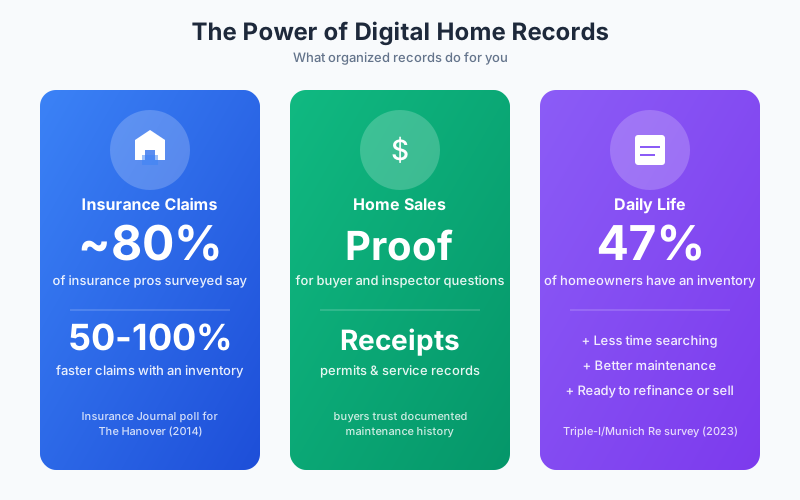
In a 2014 Insurance Journal poll of 610 insurance professionals sponsored by The Hanover Insurance Group, nearly 80% said they believe homeowners insurance claims are processed 50–100% faster when customers have completed a home inventory in advance. Homeowners with organized digital records can:
- Hand the adjuster an itemized list instead of reconstructing one from memory
- Match disputed items to a photo, receipt, or serial number
- Experience less stress during the process
Home Sales
Buyers and their inspectors ask about the age and condition of the roof, HVAC, water heater, and recent improvements. A well-documented home lets you:
- Answer those questions with receipts, permits, and service records instead of guesses
- Show the quality of improvements and upgrades you paid for
- Generate more buyer confidence with complete maintenance and improvement records
- Have paperwork ready when inspection questions come up
Daily Life
Most homeowners don't keep this information in one place: in a 2023 Triple-I/Munich Re consumer survey, only 47% of homeowners said they had prepared an inventory of their possessions. Organized homeowners benefit from:
- Less time searching for manuals, warranties, and contractor details
- Better follow-through on routine maintenance, because the schedule and history are in front of you
- Fewer surprises when an appliance or system reaches the end of its life
- A clear record of improvements when it's time to refinance or sell
Getting Started Today
Don't let perfection paralysis stop you. Start with these three simple steps:
- Create a folder on your preferred platform
- Take photos of each room in your home
- Scan or photograph your most recent utility bill
From this foundation, you can build gradually. Add one document per day, and within a month, you'll have a robust digital home record.
Conclusion
Creating a digital home record is one of the best investments you can make in your property. It protects your investment, simplifies your life, and provides peace of mind. Start today with just one folder and one document. Your future self will thank you when you need that warranty information at 9 PM on a Sunday or when you're filing an insurance claim after a storm.
Remember: The best digital home record is the one you actually use and maintain. Keep it simple, keep it current, and keep it backed up. Your home is likely your largest investment—treat its documentation with the care it deserves.