
Picture this hypothetical: a kitchen fire at 3:47 AM. Everyone gets out safely, but the kitchen and living room are destroyed. A few days later, the insurance adjuster asks the question that decides how the claim goes: "Can you prove what you lost?"
For many people, the honest answer is no. Receipts were in a drawer that burned. Photos of the remodeled kitchen were on a phone that didn't survive. Nobody wrote down appliance serial numbers. And under stress, it's hard to remember everything you owned, let alone what it cost.
A policy can be perfectly adequate and still pay less than it could, simply because the homeowner can't document their belongings.
The Stakes Are Higher Than You Think
Most homeowners haven't done this work. In a 2023 Triple-I/Munich Re consumer survey, only 47% of homeowners said they had prepared an inventory of their possessions to help document losses for their insurers. That leaves more than half without one.
Here's the uncomfortable truth: Your insurance company wants to pay you fairly. But they can't pay for items you can't prove you owned.
The good news? You have time right now, before disaster strikes. A couple of hours of work today gives you the proof an adjuster will ask for later.
This comprehensive guide will show you exactly how to document your home—room by room, item by item—so that if disaster strikes, you can focus on recovery instead of fighting with your insurance company.
What You'll Learn
- Why insurance companies deny claims for "lack of proof"
- The 5 types of documentation that support a claim
- Room-by-room inventory strategy (complete in 2 hours)
- How to document high-value items properly
- Digital vs. physical backup strategies
- How to maintain your inventory (just 15 minutes per month)
Let's make sure you're ready before you ever need to file.
Why Insurance Companies Deny Claims
The Documentation Gap That Costs Thousands
Claims run into trouble for many reasons, including policy exclusions, coverage limits, and disputes over the cause or extent of damage. Documentation can't fix an exclusion, but it is the one factor you fully control, and it matters most when the question is what you owned, what it was worth, and what condition it was in.
When you dispute a settlement, the strength of your case depends heavily on what you can prove. Our insurance claims documentation guide covers exactly what adjusters look for by claim type.
What "Insufficient Documentation" Actually Means
These are the five most common documentation gaps:
1. No Proof of Ownership You can't show you actually owned the claimed items. No receipts, no photos in your home, no credit card statements.
2. No Proof of Value You can't demonstrate purchase price or current replacement cost. No appraisals for high-value items. No receipts showing what you paid.
3. No Proof of Condition Before-disaster photos don't exist. You can't show items were functional, undamaged, or well-maintained before the loss.
4. Inaccurate Memory-Based Inventory Under stress, people forget a large share of what they own. That rushed claim filed days after the disaster? It's likely missing items you forgot, and their value adds up.
5. Policy Requirement Failures High-value items weren't scheduled separately on the policy. Jewelry exceeds the policy's sub-limit for unscheduled jewelry. No replacement cost coverage, so depreciation tanks your payout.
Example Scenarios: Where Documentation Gaps Hurt
The three scenarios below are illustrative, not real claims. They show common ways a claim can fall short, and what would have closed the gap. How any real claim is settled depends on the policy and the facts.
Example 1: A Flooded Finished Basement
The situation: A finished basement floods. It held a home theater, a workshop full of tools, and years of stored belongings. The homeowner estimates the loss from memory.
Where it falls short:
- No photos of the finished basement before the flood
- Few receipts for items bought over many years
- Boxes of stored belongings that nobody can itemize
- No record of the tools in the workshop
What would have helped: A single dated video walkthrough of the basement, with a slow pan across the workshop and storage shelves. It takes about 10 minutes and gives the adjuster something concrete to work from. (Also check whether your policy covers flood at all; standard homeowners policies typically exclude it.)
Example 2: A Recently Remodeled Kitchen
The situation: A kitchen remodeled with custom cabinets, upgraded appliances and stone countertops is destroyed in a fire a few months later.
Where it falls short:
- Contractors paid informally, with no detailed contract
- No "after" photos showing the finished work
- No receipts or specifications for the custom cabinets
- Without proof of upgrades, the insurer may price replacement at a standard grade
What would have helped: Photos of the finished kitchen showing appliance brands and models, scanned contracts and invoices, and the cabinet and countertop specifications. Roughly 30 minutes of work.
Example 3: Jewelry Above the Policy Limit
The situation: A burglary takes jewelry that includes inherited pieces and items bought over decades.
Where it falls short:
- Jewelry wasn't scheduled separately on the policy, so a sublimit for unscheduled jewelry applies (often in the low thousands of dollars; check your policy)
- No current appraisals
- No photos of individual pieces
- No purchase records
What would have helped: Photos of each piece, current appraisals, and scheduling high-value items on the policy. A couple of hours plus a call to your agent.
See the pattern? In each example, the missing piece was something that takes minutes or hours to create beforehand and is often impossible to reconstruct afterward.
What Insurance Companies Actually Want
Adjusters need to establish four things: that you owned an item, what it was, what condition it was in, and what it would cost to replace. Here's the documentation that answers each question:
1. Visual Proof
- Photos or videos of items in your home
- Clear images showing brand, model, and condition
- Date-stamped documentation when possible
- Evidence items existed and were in working order
2. Purchase Proof
- Original receipts (physical or digital)
- Credit card statements
- Bank records showing purchase
- Appraisals for valuables
- Contractor invoices for improvements
3. Serial Numbers
Especially critical for:
- Major appliances
- Electronics (TVs, computers, cameras)
- Tools and equipment
- Musical instruments
- Exercise equipment
- High-value items
4. Condition Documentation
- Photos showing items in working order
- Maintenance records (HVAC, appliances)
- Repair receipts
- Age and purchase date information
5. Policy Compliance
- High-value items scheduled separately (jewelry, art, collectibles)
- Appraisals updated every 3-5 years
- Understanding coverage limits
- Replacement cost vs. actual cash value election
The short version: if you can walk an adjuster through your home with photos, receipts and serial numbers, you've answered most of the questions that slow claims down.
Learn how our home inventory system works →
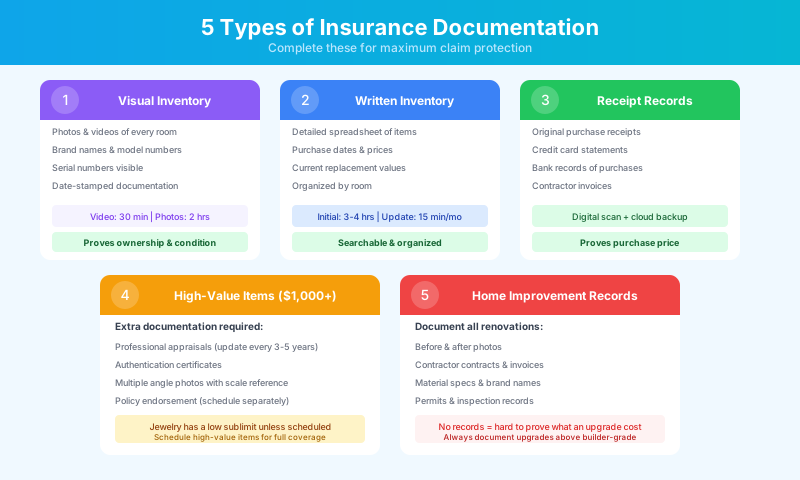
The 5 Types of Documentation That Support a Claim
Documentation Type 1: Visual Inventory
What It Is: Comprehensive photos and/or video of every room and item in your home.
Why It Matters:
- Proves you owned items
- Shows condition before disaster
- Jogs memory during claims process
- Captures model numbers and brands visible in images
- Provides strong evidence in claim disputes
Video Walkthrough Method (Fastest - 30 minutes)
Best for: Complete coverage in minimal time
How to Do It:
- Start at your front door, verbally announce the date
- Walk through each room slowly with your phone
- Narrate as you go: "This is our living room. The TV is a 65-inch Samsung purchased in 2022 for $1,200. The leather couch was $2,500 from..."
- Open closets, cabinets, and drawers
- Zoom in on brand labels and serial numbers
- Show items in working order (TVs on, appliances running)
- Don't forget: Garage, basement, attic, outdoor items, vehicles
Time Investment: 30-45 minutes Best Practice: Do this annually, especially after major purchases
Photo Inventory Method (Most Thorough - 2 hours)
Best for: Detailed documentation and easier organization
How to Do It:
- Take wide shot of each room (all four walls)
- Take individual photos of valuable items
- Capture brand labels, serial numbers, model information
- Include receipts in photo when possible
- Date stamp all photos
- Organize by room in digital folders
Time Investment: 2-3 hours initially Best Practice: Update quarterly, immediately after major purchases
My Recommendation: Do BOTH
- Annual video walkthrough for comprehensive coverage
- Detailed photos of high-value items (updated as needed)
- Total time investment: about 3 hours per year
Download our Room-by-Room Photo Inventory Checklist →
Documentation Type 2: Written Inventory
What It Is: Detailed spreadsheet listing every significant item in your home.
Why It Matters:
- Searchable and organized
- Easy to update
- Helps with memory during claims
- Shows insurance company you're serious
- Useful for estate planning too
What to Include:
| Column | Information | Example | |--------|-------------|---------| | Room | Location in home | "Master Bedroom" | | Item | Description | "Mattress - King Size" | | Brand/Model | Specific details | "Tempur-Pedic ProAdapt" | | Purchase Date | When bought | "06/2021" | | Purchase Price | Original cost | "$3,499" | | Current Value | Replacement cost | "$3,699" | | Serial Number | If applicable | "TP-2021-K-1234" | | Receipt Location | Where documented | "File: Bedroom Receipts" | | Photo Reference | Image file name | "IMG_2021_bedroom_01.jpg" |
Time Investment:
- Initial creation: 3-4 hours
- Monthly updates: 10-15 minutes
- Major purchase additions: 5 minutes each
Pro Tip: Start with rooms containing highest-value items (master bedroom, home office, garage with tools) then work through the rest.
Download our Room-by-Room Inventory Worksheet (Excel with 60+ sample entries) →
Or start your Digital Home Record now - guided setup walks you through room-by-room →
Documentation Type 3: Receipt & Purchase Records
What It Is: Organized digital and physical copies of purchase receipts.
Why It Matters:
- Proves purchase price (not just your estimate)
- Shows purchase date for depreciation calculations
- Required for high-value item claims
- Supports replacement cost claims vs. actual cash value
What to Keep:
- Major appliances (refrigerator, washer, dryer, HVAC, water heater)
- Electronics (TVs, computers, tablets, cameras, gaming systems)
- Furniture (couches, beds, dining sets, desks)
- Tools & equipment ($100+)
- Jewelry & watches ($500+)
- Home improvements (remodels, new roof, HVAC replacement)
- Art & collectibles (paintings, sculptures, collections)
- Musical instruments
- Exercise equipment
- Outdoor equipment (lawn mower, snow blower, grill)
Organization System:
Digital (Recommended):
- Scan or photograph all receipts
- Organize by room or category
- Name files clearly: "2022-06-Samsung-TV-Living-Room.pdf"
- Store in cloud (Google Drive, Dropbox, MyHomePlatform's Document Vault)
- Backup to external hard drive
Physical:
- Create labeled folders by room
- Store in fireproof safe or offsite (bank safety deposit box)
- Never rely on physical copies alone (fire/flood risk)
Don't Have Receipts? No problem:
- Check email for online purchase confirmations
- Request credit card statements showing purchases
- Contact retailers for purchase history
- Use MyHomePlatform's Home Inventory to rebuild records going forward
Documentation Type 4: High-Value Item Special Documentation
What It Is: Extra documentation for items worth $1,000+
Why It Matters:
- Most policies have sub-limits for certain categories
- Jewelry: typically $1,500-$2,500 limit
- Art: typically $1,500-$5,000 limit
- Cash: typically $200-$500 limit
- Electronics: may have aggregate limits
Items need ing separate scheduling or documentation:
- Jewelry (engagement rings, watches, heirlooms)
- Fine art and collectibles
- Musical instruments (professional quality)
- Cameras and photography equipment (professional)
- Furs and designer clothing
- Silverware and china
- Wine collections
- Firearms and ammunition
- High-end electronics
- Antiques and furniture
Required Documentation:
-
Professional Appraisal (insurers often ask for one before scheduling a high-value item)
- Use certified appraiser
- Update every 3-5 years
- Keep appraisal certificate
-
Authentication Certificates (for collectibles, art, jewelry)
- Certificate of authenticity
- Grading reports (for gems)
- Provenance documentation
-
Detailed Photos
- Multiple angles
- Close-ups of distinguishing features
- Scale reference (next to ruler)
- Hallmarks, signatures, labels
-
Serial Numbers (when applicable)
- Musical instruments
- Firearms
- High-end watches
- Electronics
-
Policy Endorsement (schedule items separately)
- Contact your insurance agent
- Add riders for high-value items
- Increases coverage limits for specific items
- Usually costs 1-2% of item value annually
Illustrative cost example (your sub-limit and premium will differ):
- $15,000 engagement ring
- Policy sub-limit for unscheduled jewelry: $2,500
- Gap if the ring is not scheduled: $12,500
- Cost to schedule separately: roughly $150-$300/year
- Result: Full $15,000 coverage
Time Investment: 2-3 hours for all high-value items
Documentation Type 5: Home Improvement Records
What It Is: Complete documentation of renovations, additions, and major repairs.
Why It Matters:
- Increases your home's rebuild cost
- Proves value added above base policy
- Shows quality of materials used
- Required for custom work claims
- Affects replacement cost calculations
What to Document:
- Kitchen/bathroom remodels
- Room additions
- Finished basements
- New roofing
- HVAC system replacements
- Window replacements
- Flooring installations
- Deck/patio construction
- Fence installations
- Landscaping (major projects)
- Pool installations
- Solar panel additions
Documentation to Keep:
-
Before and After Photos
- Wide angles showing full project
- Close-ups of finishes and materials
- Work in progress photos
-
Contractor Documentation
- Written contracts
- Itemized invoices
- Material receipts
- Warranty information
- Permits and inspections
- Contractor license/insurance info
-
Material Specifications
- Brand names and model numbers
- Quality grades (e.g., "Grade A maple hardwood")
- Square footage/quantities
- Special features or customizations
-
Proof of Payment
- Cancelled checks
- Credit card statements
- Wire transfer confirmations
- Lien waivers from contractors
Why This Saves Money:
Illustrative example (hypothetical figures): Kitchen Remodel
- Your original policy: Based on builder-grade kitchen
- Your actual kitchen: $45,000 custom remodel
- Without documentation: The insurer may price a builder-grade replacement (say, $12,000)
- With documentation: You can show what was actually installed and ask for like-kind replacement
- Potential gap: $33,000, depending on your policy terms
Update Your Policy: After major improvements, contact your insurance agent to increase coverage limits based on new home value.
Store all your home improvement records securely in your Digital Home Record →
Room-by-Room Documentation Strategy
The most effective way to document your home is systematically, room by room. Here's exactly how to do it:
The 2-Hour Complete Home Inventory Method
What You Need:
- Smartphone or camera
- Notebook or laptop
- 2 hours of uninterrupted time
- Our downloadable checklist
The Process:
Living Room & Family Room (15 minutes)
Document:
- TV and entertainment systems (brand, model, serial number)
- Furniture (couch, chairs, tables, lamps)
- Decor (artwork, mirrors, rugs, curtains)
- Books and media
- Gaming systems and accessories
- Sound systems
Pro Tip: Open TV settings to show model number on screen. Flip furniture to photograph manufacturer tags.
Kitchen (20 minutes)
Document:
- All appliances (refrigerator, stove, dishwasher, microwave)
- Small appliances (coffee maker, toaster, mixer, blender)
- Cookware and bakeware
- Dishes and glassware
- Utensils and gadgets
- Food storage containers
Pro Tip: Open appliances to show serial number plates. Photograph inside pantry and cabinets.
Bedrooms (15 minutes each)
Document:
- Bed and mattress (brand, model)
- Dressers and nightstands
- Clothing (high-value items like suits, coats, designer pieces)
- Shoes (document expensive pairs)
- Bedding and linens
- Electronics (alarm clocks, fans, etc.)
- Jewelry (separately, detailed photos)
- Watches
Pro Tip: Open closets. Video sweep is fastest for clothing documentation.
Bathrooms (10 minutes each)
Document:
- Fixtures and finishes (if upgraded)
- Small appliances (hair dryer, electric toothbrush, etc.)
- High-value toiletries (perfumes, skincare)
- Towels and linens
- Medicine cabinet contents (expensive medications)
Home Office (20 minutes)
Document:
- Computer equipment (desktop, laptop, monitors, printers)
- Software and licenses (business software can be expensive)
- Office furniture (desk, chair, filing cabinets)
- Books and reference materials
- Office supplies (high-quality items)
- Tech accessories (keyboards, mice, webcams, headphones)
Pro Tip: Computer serial numbers are often on bottom of laptop or back of monitors. Photograph license codes for expensive software.
Garage & Workshop (25 minutes)
Document:
- Tools (power tools, hand tools, tool chests)
- Lawn equipment (mower, trimmer, blower, pressure washer)
- Vehicles (cars, motorcycles, boats, RVs - separate insurance but document condition)
- Sporting goods (bikes, golf clubs, camping gear)
- Seasonal items (holiday decorations)
- Storage items (luggage, coolers, etc.)
- Workshop equipment (workbenches, vises, etc.)
Pro Tip: This is where most people underestimate value. Quality tools add up fast, and a well-stocked workshop can be worth far more than people expect.
Basement & Attic (20 minutes)
Document:
- HVAC system and water heater (model, serial number, age)
- Storage items (boxes - open and photograph contents)
- Exercise equipment
- Extra furniture
- Seasonal items
- Hobby supplies and collections
Pro Tip: Don't just photograph boxes. Open them and document contents, especially valuable stored items.
Outdoor Spaces (15 minutes)
Document:
- Grill and outdoor kitchen
- Patio furniture
- Planters and garden decor
- Shed contents
- Outdoor lighting
- Pool equipment and accessories
- Playground equipment
Total Time: ~2 hours for thorough documentation
Download the Complete Room-by-Room Inventory Checklist →
How to Store and Protect Your Documentation
You've spent 2 hours documenting everything. Now make sure that documentation survives when your home doesn't.
The 3-2-1 Backup Rule
3 copies of your documentation 2 different storage types (cloud + physical) 1 copy stored off-site
Why This Matters: If your home burns down, your documentation needs to survive. Physical documents in a file cabinet won't help you.
Recommended Storage Strategy
Primary Storage: Cloud-Based (Survives any disaster)
- MyHomePlatform's Secure Document Vault (built for home documentation)
- Google Drive or Dropbox (organize by room)
- iCloud Photos (for images)
- Email to yourself (quick backup option)
Secondary Storage: Physical Off-Site
- Bank safety deposit box (yearly update)
- Trusted family member's home (different geographic area)
- Fireproof/waterproof safe (in different location than primary home)
Tertiary Storage: Local Encrypted
- External hard drive (store off-site)
- USB drive in fireproof safe
- Network-attached storage (NAS) with off-site backup
What NOT to Do
❌ Don't rely only on physical documents in your home ❌ Don't store documentation in the same location as items ❌ Don't keep only one digital copy ❌ Don't use unsecured cloud storage for sensitive info ❌ Don't forget to update when you make purchases
Security Considerations
Your home inventory contains sensitive information:
- Home layout and contents (security risk if leaked)
- Serial numbers (could be used for fraud)
- High-value item locations
- Purchase prices and dates
Best Practices:
- Use encrypted cloud storage
- Password-protect documents
- Enable two-factor authentication
- Don't share publicly on social media
- Limit access to trusted family members only
Maintaining Your Inventory: 15 Minutes Per Month
Creating your initial inventory takes 2 hours. Keeping it updated takes just 15 minutes monthly.
Monthly Maintenance Routine
Week 1: Review and Update (10 minutes)
- Review last month's purchases
- Add new items to inventory
- Update photos if needed
- Check that backups are current
Week 2: Photograph New Items (5 minutes)
- Document recent purchases
- Update room photos if furniture moved
- Capture receipts digitally
Week 3: Verify High-Value Items (5 minutes)
- Check that jewelry photos are current
- Verify valuable items still insured properly
- Note any condition changes
Week 4: Backup Check (5 minutes)
- Verify cloud backup is syncing
- Check that off-site backup is accessible
- Test document retrieval
Annual Deep Review
Once per year (suggested: same time as policy renewal):
- Complete video walkthrough of entire home
- Update written inventory
- Review insurance coverage limits
- Update appraisals for high-value items (if 3-5 years old)
- Verify policy endorsements for scheduled items
- Review and adjust coverage based on new purchases
Time Investment: 3-4 hours annually Result: Always-current documentation that protects your investment
Set Up Automated Reminders for Home Inventory Updates →
Special Circumstances: What to Document When
Before a Hurricane or Major Storm
When you have advance warning (2-7 days):
- Do quick video walkthrough of entire home
- Photograph exterior of home from all sides
- Document outdoor items that might blow away
- Capture current condition of roof, siding, windows
- Move important documents to waterproof container
- Update digital inventory immediately
- Email yourself photos as quick backup
Time Investment: 30 minutes Why It Matters: Proves pre-storm condition, prevents disputes about what damage was caused by storm vs. pre-existing. For a complete storm-readiness plan beyond documentation, see the home emergency preparedness guide.
When Buying a New Home
Within first 30 days:
- Complete initial home inventory
- Photograph home in "move-in" condition
- Document all existing fixtures and finishes
- Record serial numbers of included appliances
- Review insurance coverage for new home
- Identify any high-value items needing special coverage
Why It Matters: Establishes baseline for future claims, ensures adequate coverage from day one. The new homeowner checklist guide sequences these tasks alongside everything else your first month requires.
After Major Purchases
Within 24 hours of purchase:
- Photograph item with receipt
- Record serial number
- Update written inventory
- Save digital receipt
- Add to cloud backup
- Review if item needs separate insurance scheduling
Why It Matters: Captures documentation while purchase details are fresh, receipt is available, and packaging with model info is still accessible
When Selling Your Home
90 days before listing:
- Update complete home inventory (you'll need it for new home)
- Transfer documentation to new location
- Note which items are staying vs. going with sale
- Document home's condition for buyer
- Keep records of included fixtures/appliances
Why It Matters: Smooth transition to documenting new home, clear record of what transferred with sale
Common Mistakes to Avoid
Mistake #1: "I'll Remember Everything"
Reality: Under stress after a disaster, it's hard to recall more than the most obvious items you owned.
Solution: Document NOW, while you're calm and have time to walk through your home thoroughly.
Mistake #2: "My Insurance Will Cover It"
Reality: Insurers pay for what you can show you owned. Without documentation, it is harder to establish what an item was, so settlements can end up based on a generic, depreciated estimate.
Illustrative example (hypothetical figures):
- 5-year-old laptop, no receipt
- Your claim: "I paid $1,200 for it"
- Possible payout: $250 (depreciated value of a generic laptop)
- Difference: $950
Solution: Keep receipts and photos proving what you actually owned.
Mistake #3: "I Don't Have Anything Valuable"
Reality: Most people underestimate the total value of what they own until they add it up.
Quick Test: Add up just one room:
- TV: $800
- Couch: $1,200
- Coffee table: $300
- Lamp (2): $200
- Rug: $400
- Books/media: $500
- Gaming system: $500
- One room total: $3,900
Now multiply by the number of rooms in your home.
Solution: Do the full inventory. You'll be shocked by the total value.
Mistake #4: "Physical Files Are Enough"
Reality: House fire burns your file cabinet. Flood destroys basement storage. Tornado levels entire home.
Solution: Digital cloud backup is mandatory. Physical is optional secondary.
Mistake #5: "I'll Do It Later"
Reality: "Later" tends to stay later. Fewer than half of homeowners have a home inventory, according to the Triple-I survey cited above.
Solution: Block 2 hours on your calendar THIS WEEK. Treat it like a doctor's appointment—non-negotiable.
Mistake #6: "Just Photos Are Enough"
Reality: Photos prove ownership but not value. You need receipts/proof of purchase price.
Solution: Complete documentation = Photos + Receipts + Written inventory + Serial numbers
Mistake #7: "I Updated It 5 Years Ago"
Reality: Households keep buying furniture, electronics and appliances. A five-year-old inventory is likely missing a meaningful share of what you own now.
Solution: Set recurring annual reminder. Update immediately after major purchases.
The Cost of NOT Documenting Your Home
The value of documentation scales with what's at stake. A partial fire, a burglary, a burst pipe or a total loss each involve questions about what you owned and what it was worth. The larger the loss, the more items there are to prove, and the harder it is to reconstruct them from memory.
To get a sense of your own exposure, try this quick exercise:
- Walk through one room and add up a rough replacement cost for everything in it.
- Multiply by the number of rooms, plus the garage, basement and attic.
- Compare that with the personal property limit on your policy.
Most people are surprised by the total. Every item in that estimate is something you may need to prove in a claim.
Time Investment: About 2 hours to start, plus a few minutes after major purchases and an annual refresh.
Example Scenarios: Documentation That Holds Up
These two scenarios are illustrative, not real claims. They show what a well-documented claim looks like in practice.
Example: A Flooded First Floor
What the homeowner had:
- A complete video walkthrough recorded a few months earlier
- Digital receipts for major purchases
- Photos of a completed kitchen remodel
- An inventory spreadsheet listing several hundred items
Why it helps: The claim can be filed within days with an itemized list, and each disputed item can be matched to a photo or receipt. Negotiations focus on value rather than on whether items existed. (Flood damage usually requires separate flood insurance; check your coverage.)
Example: A Kitchen Fire After a Remodel
What the homeowner had:
- Detailed photos of the completed remodel
- Contractor invoices and receipts
- Cabinet specifications and brand details
- Appliance serial numbers and purchase receipts
Why it helps: If the first estimate prices a builder-grade replacement, the homeowner can submit invoices and specifications showing what was actually installed and ask the adjuster to re-evaluate. Whether the final settlement covers the full cost depends on the policy (for example, replacement cost versus actual cash value), but without proof of the upgrades there is little to negotiate with.
Your 2-Hour Action Plan
Ready to protect your home? Here's exactly what to do:
This Week: Initial Documentation (2 hours)
Hour 1: Visual Inventory
- [ ] Charge your phone/camera
- [ ] Download our room-by-room checklist
- [ ] Do complete video walkthrough
- [ ] Upload video to cloud storage immediately
Hour 2: High-Value Items
- [ ] Photograph expensive items individually
- [ ] Capture serial numbers
- [ ] Document jewelry and valuables
- [ ] Upload all photos to cloud
This Month: Complete the System (3 hours)
Week 1:
- [ ] Create written inventory spreadsheet
- [ ] Add all rooms and major items
- [ ] Note purchase dates and prices (approximate if needed)
Week 2:
- [ ] Gather existing receipts
- [ ] Photograph or scan all receipts
- [ ] Organize digital receipt folder by room
- [ ] Upload to secure cloud storage
Week 3:
- [ ] Review insurance policy
- [ ] Identify coverage limits
- [ ] Schedule high-value items if needed
- [ ] Contact agent about coverage gaps
Week 4:
- [ ] Set up off-site backup
- [ ] Test document retrieval from cloud
- [ ] Set annual reminder to update
- [ ] Share documentation location with family
This Year: Maintain and Protect (15 min/month)
Monthly:
- [ ] Add new purchases to inventory
- [ ] Update photos as needed
- [ ] Verify cloud backup is working
Annually:
- [ ] Complete new video walkthrough
- [ ] Update written inventory
- [ ] Review insurance coverage
- [ ] Update appraisals for valuables
Download Your Free Insurance Documentation Checklist & Templates →
The Bottom Line
Every example in this guide comes down to the same thing: what you can't prove is hard to get paid for. Documentation can't guarantee how a claim is settled, but it gives you evidence to work with.
You don't have to start from scratch after a loss.
Two hours of work today helps protect decades of investment. Every item you've worked hard to purchase. Every memory captured in belongings. Every upgrade you've made to your home.
Insurance companies want to pay fair claims. They just need proof.
Give them that proof.
Take Action Now
Option 1: DIY with Our Free Resources Download our complete Insurance Documentation Pack (100% FREE):
- Comprehensive Insurance Documentation Checklist (47-page PDF with 280+ items)
- Room-by-Room Inventory Worksheet (Excel with 60+ sample entries)
- Claims Documentation Template (Excel for tracking claims)
- Home Maintenance Log Template (track repairs & improvements)
- Budget Planning Worksheet (Excel for maintenance costs)
Download All Free Templates & Checklists →
Option 2: Automate with Digital Home Record Skip the spreadsheets and paper filing. Use MyHomePlatform to:
- Create your home inventory in minutes with guided walkthrough
- Store photos and documents alongside your inventory
- Get automatic reminders to update inventory
- Access from anywhere (home, phone, or during emergency)
- Share with family members and insurance agent
- Track warranties and maintenance alongside documentation
Learn more about the Digital Home Record →
Option 3: Use Smart Tools to Speed Documentation Make documentation faster with integrated tools:
- Maintenance Calendar - Track repairs with automatic photo prompts
- Document Vault - Store receipts, warranties, and manuals
- Home Value Tracker - Track your home's worth & improvements
- Service Provider Directory - Save contractor invoices automatically
Explore All Home Documentation Features →
Frequently Asked Questions
Q: Do I really need to document everything? What about small items?
A: Focus on items worth $25+. Document rooms thoroughly, but you don't need to photograph every fork. However, quality cookware, small appliances, and collections of "small" items add up fast. When in doubt, document it.
Q: What if I don't have receipts anymore?
A: Start fresh today. For existing items without receipts:
- Check email for online purchase confirmations
- Request older credit card or bank statements from your card issuer or bank
- Estimate purchase date and cost (photos prove ownership)
- Going forward, save all receipts digitally
Q: How long does insurance give me to file a claim?
A: It depends on your policy and your state. Most policies require "prompt" notice of a loss and set their own deadlines for submitting a proof of loss and for adding items later, so check the "Duties After Loss" section and ask your insurer to confirm the dates in writing. Report the loss as soon as you can; having documentation ready makes the initial claim more complete.
Q: Will documenting my home increase my insurance premiums?
A: No. Insurance premiums are based on coverage amounts and risk factors, not whether you have documentation. However, proper documentation ensures you have ADEQUATE coverage (many people are underinsured).
Q: What about renter's insurance?
A: Everything in this guide applies to renters too! Renter's insurance covers your belongings, and documentation is just as critical. Renters often own more than they realize, so add it up before choosing a coverage limit.
Q: How do I handle inherited items with unknown value?
A: Get professional appraisal for items that seem valuable (jewelry, antiques, art). Cost: often $50-$200 per item, depending on the appraiser and the item. An appraisal helps you set the right coverage and supports a claim if the item is lost.
Q: Can I use my phone or do I need a professional camera?
A: Your phone is perfect! Modern smartphones take high-quality photos. What matters is capturing clear images of brands, models, and serial numbers—phone cameras do this excellently.
Q: What if my home is messy? Do I need to clean before documenting?
A: Document as-is. This is for your protection, not a home tour. Insurance adjusters don't care about clutter—they need to see what you owned. That said, for video walkthroughs, clear walkways make it easier to capture everything.
Related Resources
Continue Your Home Protection Journey:
- The Ultimate Home Maintenance Schedule - Protect your investment with proper maintenance (280+ tasks)
- Download Free Seasonal Maintenance Checklists - Spring, Summer, Fall & Winter checklists
- Home Maintenance Cost Calculator - Estimate annual maintenance needs
- Emergency Fund Calculator - Calculate your home emergency savings
- Insurance Coverage Calculator - Ensure adequate coverage
MyHomePlatform Features for Home Documentation:
- Digital Home Record - Complete home documentation system
- Home Inventory - Room-by-room inventory with photos
- Document Vault - Secure receipt and warranty storage
- Maintenance Calendar - Track repairs & improvements
- Smart Alerts - Automatic inventory update reminders
- Home Value Tracker - Track home worth & improvements
Remember: The best time to document your home was when you moved in. The second best time is right now.
Don't wait for disaster to wish you'd spent these 2 hours. Your future self will thank you.
Documentation only pays out if your policy limits are right. Pair this guide with How Much Home Insurance Do I Need? A 2026 Replacement-Cost Guide and our insurance coverage calculator so your coverage limits match what you've documented.
Learn more about the Digital Home Record →
Have questions about home inventory or insurance documentation? Contact our team - we're here to help protect your home.